

Note: This article contains affiliate links. If you click on these links and make a purchase, I may earn a small commission at no extra cost to you. This helps support my research and content. Read my full affiliate disclosure here.
A well-chosen touch screen irrigation controller makes maintaining a healthy garden far less hands-on. With an intuitive display you can set schedules, adjust run times, and respond to weather without fiddling with tiny buttons or cryptic menus. For homeowners and serious gardeners alike, the right controller improves plant health while cutting water waste. This guide covers five shortlisted touch screen irrigation controllers vetted for home garden use. We evaluated each one for how easy it is to program, how reliably it runs scheduled cycles, and how well it responds to local weather inputs. Read on to understand the practical tradeoffs that matter in everyday garden management.
Top Picks at a Glance
| Best Overall The best all-around choice for most situations | Hunter PRO‑HC 6‑Zone Wi‑Fi Smart Irrigation Controller (Hydrawise) |  |
| Best Quality Built to a higher standard if you want something more solid | Hunter PRO‑HC WiFi Smart Sprinkler Controller, 12‑Zone |  |
| Best Value The sweet spot between price and what you get | HiOazo Smart Touchscreen Irrigation Controller — 8-Zone, 2.4GHz Wi‑Fi |  |
| Best Budget The cheapest option that still gets the job done reliably | HiOazo Smart Sprinkler Controller with Touch TFT — 6 Zones, Wi‑Fi |  |
| Most Popular A crowd favorite that many people choose with confidence | Hunter HPC400 Hydrawise Smart Wi‑Fi Sprinkler Controller, 4‑Zone |  |
Hunter PRO‑HC 6‑Zone Wi‑Fi Smart Irrigation Controller (Hydrawise)
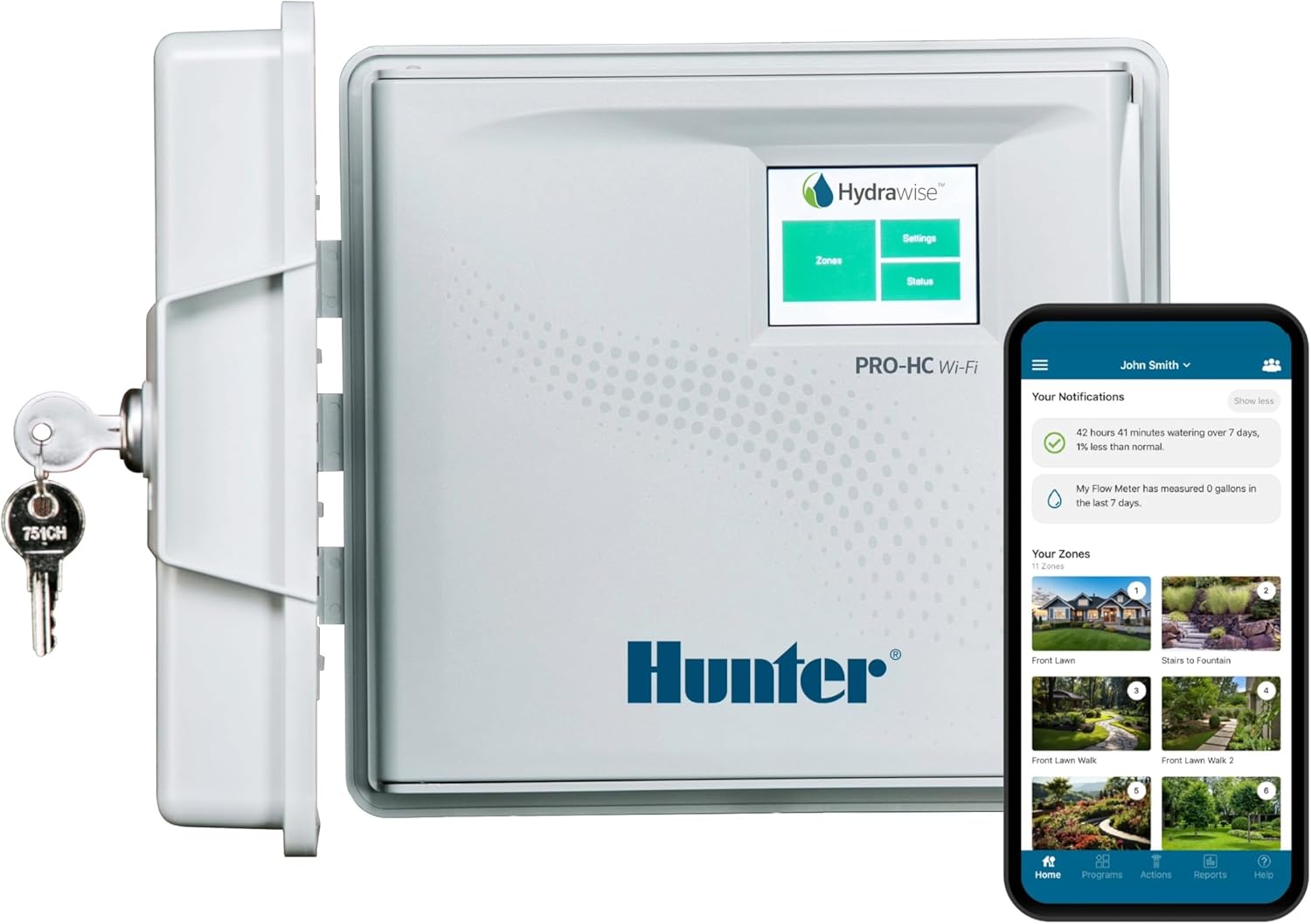
| Zones | 6 stations |
|---|---|
| Wi‑Fi | Built‑in 2.4 GHz |
| Display | 2.75 inch full‑color touchscreen |
| Sensor ports | Two sensor inputs |
| P/MV output | One pump/master valve output |
The Hunter PRO‑HC600 is a 6‑station smart irrigation controller built for reliable, water‑efficient landscape management. It connects to the Hydrawise platform over built‑in 2.4 GHz Wi‑Fi so you can monitor and adjust schedules from a phone, tablet, or desktop, while the full‑color 2.75 inch touchscreen lets you program and test zones at the panel without the app. Hydrawise applies predictive weather data and local station inputs to automatically change run times, and the system supports flow meters, Clik rain sensors, and a pump/master valve output for professional installs. The controller includes wiring diagnostics via a milliamp sensor to speed troubleshooting and an IP44‑rated UV resistant cabinet for indoor or outdoor mounting. For performance‑focused users this translates to precise zone control, fewer callbacks, and measurable water savings, though advanced features require time to configure and optional sensors to realize full leak detection and flow monitoring capability.
Best for: Buyers who prioritize efficient, professional‑level irrigation control and remote management for small to medium landscapes; ideal for contractors or committed homeowners who want precise, data‑driven watering.
Less Ideal for: Casual gardeners who want a simple plug‑and‑play timer without network setup or those who do not plan to add optional sensors for flow monitoring.
- Hydrawise weather‑based scheduling adjusts watering automatically for local conditions
- Built‑in Wi‑Fi and remote app control for on‑the‑go adjustments and monitoring
- Full‑color touchscreen enables quick on‑site programming and zone testing
- Supports flow meters and sensor inputs for leak detection and automated shutoff
- Milliamp wiring sensor provides continuous diagnostics to simplify maintenance
- Advanced features like flow monitoring and full leak protection require buying and installing optional sensors
Verdict: Choose the Hunter PRO‑HC600 if you want professional, weather‑driven irrigation control with on‑site touchscreen programming and full remote management via Hydrawise.
Hunter PRO‑HC WiFi Smart Sprinkler Controller, 12‑Zone

| Zones | 12 station |
|---|---|
| Connectivity | WiFi (Hydrawise) |
| Display | Full‑color touchscreen |
| Sensor support | Rain, flow meter, sensor inputs |
The Hunter PRO‑HC is a professional‑grade 12‑zone irrigation controller aimed at homeowners or property managers who want precise, water‑saving automation. It pairs a full‑color touchscreen for fast on‑site setup with WiFi and the Hydrawise app for remote scheduling, alerts, and system monitoring. The controller uses predictive weather‑based adjustments that factor in rainfall, temperature, wind, and humidity so run times are reduced when conditions require less water. It also supports sensors, a flow meter, master valve output, and built‑in wire fault detection for more reliable operation and proactive maintenance. Typical use is mounting outdoors or indoors near the irrigation manifold, programming zones locally or in the app, then letting Hydrawise fine‑tune durations daily. The main limitations are that it is optimized for users who want a robust, expandable system rather than a minimal plug‑and‑play timer and installation typically requires basic wiring familiarity or contractor help for more complex setups.
Best for: Buyers who want a reliable, water‑saving smart controller that can manage a full yard or small commercial landscape and who value remote management and expandability.
Less Ideal for: People who need a very simple plug‑and‑play sprinkler timer for one or two zones or who prefer a basic mechanical controller without WiFi features.
- Smart, weather‑based scheduling that adjusts run times using local forecast and conditions
- WiFi with Hydrawise app for remote control, alerts, and monitoring
- Full‑color touchscreen for easy local programming without the app
- Supports flow meters, sensors, and master valve output for expanded monitoring and safety
- Installation and wiring for multi‑zone systems can be complex for novice DIYers
Verdict: Choose the PRO‑HC if you want a 12‑zone, app‑driven controller that saves water with predictive weather scheduling and professional expansion options.
HiOazo Smart Touchscreen Irrigation Controller — 8-Zone, 2.4GHz Wi‑Fi

| Zones | 8 |
|---|---|
| Programs | Up to 16 plans |
| Wi‑Fi | 2.4GHz |
| Display Type | TFT |
This HiOazo controller replaces a traditional timer with a color TFT touch display and remote app control to simplify home irrigation. You can program up to 16 distinct watering plans across 8 zones, choose between continuous and soak irrigation modes, and edit schedules either on the vivid local touchscreen or through the HiOazo mobile app over 2.4GHz Wi‑Fi. Weather‑aware features automatically skip cycles for rain, freeze, or high wind to reduce water use and protect plants. The touch interface makes on‑unit adjustments straightforward when Wi‑Fi is unavailable, while the app gives convenient offsite schedule changes and monitoring. Installation is presented as quick and aimed at typical residential systems, and the controller’s clear scheduling and zone control suit mixed plantings or lawns that need different routines. Limitations include reliance on 2.4GHz Wi‑Fi only and that the unit is sized for medium systems with eight zones, so very large landscapes will need additional controllers or expansion solutions.
Best for: Homeowners who want a straightforward, hands‑on upgrade from a mechanical timer and value simple touchscreen controls plus remote scheduling to optimize water use across a typical yard.
Less Ideal for: Large properties or commercial landscapes that require more than eight zones or enterprise‑grade network compatibility should consider multi‑controller or higher‑capacity solutions.
- Full color TFT touchscreen for easy on‑unit programming and quick troubleshooting
- Remote control via 2.4GHz Wi‑Fi app for schedule edits and real‑time monitoring
- Automatic rain, freeze, and wind skip functions to save water and prevent overwatering
- Supports 8 zones and up to 16 separate watering programs for flexible scheduling
- Two irrigation modes including soak option to improve soil absorption
- Works only on 2.4GHz Wi‑Fi which may not connect to 5GHz networks
- Limited to 8 zones so not suitable as a single controller for very large systems
Verdict: If you want an easy‑to‑use touchscreen controller that pairs app convenience with weather‑smart watering for a typical 8‑zone yard, this is a practical, water‑saving upgrade.
HiOazo Smart Sprinkler Controller with Touch TFT — 6 Zones, Wi‑Fi

| Display Type | TFT |
|---|---|
| Wi‑Fi | 2.4 GHz |
| Included Components | Smart Irrigation Controller 6 Zones |
| Number of Items | 1 |
The HiOazo Smart Sprinkler Controller is a budget‑minded touch‑screen irrigation controller designed to replace a basic timer with app and local touchscreen control. It connects to 2.4 GHz Wi‑Fi so you can create and edit schedules from the HiOazo app and monitor zones remotely, while the built‑in color TFT lets you manage programs on the unit without the phone. The unit supports up to 6 zones and claims up to 16 watering plans, with two irrigation modes (standard and soak) and automated skips for rain, freeze, and wind to help conserve water. Practical benefits include quick installation and straightforward touchscreen navigation for homeowners who want simple local overrides and remote access. Limitations to note are the modest zone count for larger properties and minimal listed specs beyond the display type, so installers should verify compatibility with existing valves and sensors before buying.
Best for: Homeowners on a budget who want an easy‑to‑use touchscreen controller with basic smart features and remote app access for a small to medium yard.
Less Ideal for: Large properties or irrigation systems that need more than six zones or where professional installers require detailed technical specifications.
- Color touch TFT for intuitive local control without the app
- 2.4 GHz Wi‑Fi and app control for remote schedule management
- Weather‑aware skips (rain, freeze, wind) to reduce unnecessary watering
- Supports multiple program plans and two irrigation modes for flexible watering
- Only supports up to 6 zones which may be insufficient for larger yards
- Limited published technical details may require checking compatibility with existing systems
Verdict: A cost conscious, touch‑screen smart controller that brings app control and weather‑aware watering to small to medium yards.
Hunter HPC400 Hydrawise Smart Wi‑Fi Sprinkler Controller, 4‑Zone

| Stations / Zones | 4 (expandable up to 32) |
|---|---|
| Smart Control | Hydrawise Wi‑Fi app |
| Weather Based Watering | Yes |
| Controller Type | Outdoor, weather‑resistant |
The Hunter HPC400 is a performance-focused smart irrigation controller that brings Hydrawise app control and weather‑based scheduling to a small residential system. It typically mounts outdoors and replaces a conventional timer to let you run, monitor, and adjust schedules from a phone or browser. Key features include real‑time forecast adjustments that can reduce unnecessary runs, an intuitive touchscreen for local programming, and a weather‑resistant enclosure for year‑round outdoor use. The unit ships as a 4‑zone controller but supports expansion up to 32 zones with additional modules, which makes it useful for owners who expect to grow their landscape. Practical benefits are precise, automated watering that can cut water use and hands‑on time, remote diagnostics for troubleshooting, and straightforward DIY installation. Important limitations are that only four zones are included out of the box and expansion modules are sold separately, and advanced commercial users will want a higher‑capacity model. For homeowners prioritizing water‑smart performance, the HPC400 delivers reliable, modern control without a steep learning curve.
Best for: Homeowners who want high irrigation performance and water savings with remote smart control and expect professional‑grade scheduling without complex setup.
Less Ideal for: People who need a turnkey controller for very large commercial systems or those who prefer a basic, non‑smart timer with no app dependency.
- Hydrawise app and Wi‑Fi enable remote scheduling, monitoring, and adjustments
- Weather‑based automatic adjustments reduce water use and manual changes
- Intuitive touchscreen and labeled wiring make DIY installation straightforward
- Outdoor rated, weather‑resistant enclosure built for reliable year‑round operation
- Only includes 4 zones by default and requires separate expansion modules to handle larger systems
- Some advanced commercial or high‑zone installations will need a higher‑capacity controller
Verdict: Choose the HPC400 if you want a compact, weather‑aware smart controller that delivers remote Hydrawise control and measurable water savings while allowing future expansion.
Choosing the Right Touch Screen Irrigation Controller: Key Factors to Consider
Interface Clarity and Touch Responsiveness
A clear, responsive touchscreen makes daily adjustments and seasonal schedule changes much faster. Look for large, readable icons and straightforward menus that let you set start times, run durations, and repeating patterns without scrolling through nested screens. Responsiveness matters in damp or gloved conditions; a screen that requires exact taps can be frustrating during planting or maintenance work.
Menus that show a full-week overview or graphical timelines help you visualize overlaps between zones and avoid accidental overwatering. Consider whether the interface supports quick manual starts and skips for frost or rain events so you can react when needed.
Scheduling Flexibility
Different gardens need different schedules. Vegetable beds, turf, and potted containers often require distinct run times and frequencies. A useful controller supports multiple start times per day, custom run times per zone, and day-of-week or interval programming. Seasonal adjustments and easy copy-and-paste of programs across zones save time when plants have similar needs.
Advanced features like cycle-and-soak to reduce runoff, odd/even day scheduling for water restrictions, and temporary hold or rain delay functions are practical in many garden settings. Confirm the controller's granularity for minute-level run times and whether it supports staggered starts for many zones on the same valve bank.
Weather Sensing and Smart Adjustments
Built-in weather sensing or compatibility with local forecasts cuts water waste and protects plants. Controllers that accept local sensor input, integrate with online weather services, or allow percentage-based seasonal adjustments give you practical ways to adapt irrigation to current conditions. For example, a rainy stretch should reduce runtime automatically, while a heat wave may increase frequency.
Consider how the controller gathers weather data and how easy it is to override automatic changes. Some systems rely on cloud services that require ongoing connectivity; others accept a wired or wireless rain or soil sensor for local feedback. The ideal balance depends on whether you prefer automatic adjustments or direct manual control.
Reliability and Program Execution
A controller that reliably runs scheduled cycles keeps plants healthy and prevents surprises. Look for robust internal clocks, nonvolatile memory to retain settings after power interruptions, and clear status indicators for active zones. Controllers should handle typical household power events without losing configuration or misfiring valves.
Durability also matters in outdoor or garage-mounted installations. Weather-resistant enclosures and solid terminal blocks reduce the chance of corrosion or loose wiring that causes failures mid-season.
Installation, Wiring, and Zone Capacity
Home gardens come in all sizes, so match zone capacity to current and foreseeable needs. Controllers should have enough labeled terminals for your valve count and space for future expansion. Clear wiring diagrams and accessible screw terminals speed installation and reduce the chance of errors.
Transformer placement, mounting options, and conduit knockouts affect where you can install the controller. If you plan to shelter the controller in a garage, check whether the unit supports remote sensors and whether its transformer is compatible with common valve types. Ease of swapping transformers or adding a remote module is helpful during system upgrades.
Connectivity and Remote Control Options
Remote control is valuable for gardeners who travel or manage multiple properties. Some touchscreen controllers support Wi-Fi or wired network connections for smartphone access and firmware updates. Others offer simpler local control via the built-in screen and sensor terminals.
When considering connectivity, weigh reliability and privacy. Cloud-based features can provide convenient remote scheduling and weather data but may require account setup and periodic maintenance. Local-only options avoid external dependencies and often remain functional during internet outages.
Matching Controller Features to Garden Types
Different garden layouts call for different controller capabilities. Small patio gardens with a few drip zones may prioritize compact enclosures and simple day-of-week programming, while mixed landscapes with turf, beds, and separate container watering benefit from many zones and advanced scheduling options.
Think about the kinds of valves and emitters you use. Drip systems often need shorter, more frequent cycles to keep soil moisture even, whereas sprinkler heads require longer runs and cycle-and-soak to avoid runoff. Match the controller's scheduling options to the irrigation hardware for the best results.
- Patio containers: fewer zones, simple manual start and short run times
- Vegetable beds: frequent, short cycles or moisture-based control
- Turf areas: longer cycles with cycle-and-soak to reduce runoff
- Large mixed yards: many zones and flexible start times
Protecting Your Controller From Weather and Pests
Even if a controller is rated for outdoor use, protecting it from direct sun, heavy rain, and pests extends service life. A shaded mounting location under eaves or inside a small weatherproof housing reduces temperature extremes and UV damage to plastic parts.
Critters and insects can infiltrate enclosures and corrode terminals. Use gasketed covers and secure mounting hardware, and inspect connections seasonally. For controllers mounted in garages or utility rooms, ensure ventilation and avoid high humidity areas that accelerate corrosion.
- Mount under eaves or inside a ventilated box where possible
- Check terminal tightness annually and clean corrosion
- Use insect-proof enclosures for outdoor mounts
Integrating Sensors for Smarter Watering
Soil moisture sensors, rain sensors, and freeze sensors each offer specific protections for plants and water savings. Soil sensors can prevent irrigation in moisture-rich zones, while rain sensors suspend schedules after significant rainfall. Freeze sensors protect tender plants by preventing irrigation during freezing conditions.
When choosing sensors, consider placement and calibration. A soil sensor in the root zone of the plant type it controls gives the most relevant data. Verify that the controller supports the sensor type and allows per-zone overrides so you do not disrupt other areas when a single sensor triggers a global hold.
- Use soil sensors for vegetable beds and container mixes
- Rain sensors are inexpensive protection for broad landscape zones
- Place sensors in representative microclimates for accurate readings
Common Installation Pitfalls and How to Avoid Them
Poor documentation and confusing wiring are common causes of installation delays. Label existing valve wires and photograph current terminal layouts before swapping controllers. Verify transformer voltage and the number of valve wires to avoid surprises.
Avoid overstuffing enclosures; terminals need space for reliable connections. If you plan to expand, pick a location and controller with capacity for a few extra zones. Test each zone with the manual-run function before finalizing the installation to ensure correct valve mapping.
- Label wires and test valve operation prior to full installation
- Confirm transformer compatibility and spare zone capacity
- Use wire nuts or terminal blocks rated for outdoor use
Maintenance Tips to Keep Systems Running Smoothly
Seasonal checks prevent surprises. At the start of the watering season, inspect wiring, test each zone, and verify touchscreen responsiveness. Replace any frayed wires and tighten terminals to prevent intermittent faults.
Midseason, monitor runtime versus soil moisture to adjust schedules. At season end, use the controller's off or winterize setting if available, and protect the unit from freezing conditions to avoid water damage in valves and sensors.
- Inspect and tighten terminals annually
- Adjust schedules based on plant performance and weather
- Winterize systems in climates with freezing temperatures
How We Chose the Best Touch Screen Irrigation Controller
We focused on criteria that matter for real-world garden use. First, programming usability was essential because touchscreen controllers are chosen to simplify schedule setup and midseason adjustments. We tested interface clarity and the range of scheduling options conceptually to ensure controllers would suit common planting layouts and season changes. Second, reliability and run-time accuracy were judged by the consistency of program execution and the robustness of the scheduling engine. Third, weather responsiveness looked at built-in or supported weather-sensing features and how easily those settings can be tuned. Fourth, connectivity and integration evaluated local and cloud features that affect remote access, firmware updates, and compatibility with weather services. Fifth, installation and wiring practicality were considered for typical home setups, including wire terminals, transformer mounting, and zone support. We excluded controllers that rely solely on obscure proprietary services, lack basic timer functions, or are intended only for commercial irrigation. Products that failed to support common home wiring or that offered only token touchscreen interfaces without meaningful programmability were not shortlisted. The final selection emphasizes real gardener needs: simple touch operation, dependable scheduling, useful weather adjustments, reasonable wiring support, and clear remote or local control options.
FAQ
Can a touch screen controller be installed indoors?
Yes. Many touchscreen controllers are suitable for indoor installation in garages or utility rooms. Indoor mounting protects the unit from weather and pests, but ensure sensor wiring and transformer access are feasible from the chosen location.
Do touchscreen controllers need internet access to work?
Not always. Core scheduling functions typically run locally on the controller. Internet access is only required for cloud features, remote smartphone control, or some weather services. Local sensor-based adjustments remain functional without connectivity.
Will a touchscreen controller work with my existing valves?
Most home controllers use standard 24 VAC valve outputs and work with common solenoid valves. Check transformer capacity and the number of zone terminals. If valves draw uncommon current, confirm the controller or an external relay can handle the load.
How do weather sensors interact with touchscreen controllers?
Controllers can accept input from rain, freeze, or soil moisture sensors to pause or modify schedules. Some integrate online forecast data; others rely on local wired or wireless sensors. The controller should allow sensible defaults and manual overrides so sensor triggers do not disrupt critical zones.
What should I do if the touchscreen becomes unresponsive?
Start with a soft reset or power cycle to clear temporary glitches. Inspect the enclosure for moisture or dirt on the screen and clean with a soft, dry cloth. If problems persist, consult the manual for factory reset steps and verify the unit is not exposed to extreme heat, cold, or condensation.
How many zones do typical home touchscreen controllers support?
Home controllers commonly support anywhere from a few zones up to 16 or more. Choose a controller with current capacity plus room for expansion. If you expect new beds or separate container systems, plan for additional zones during the purchase.
Final Verdict
Prioritize ease of programming and dependable schedule execution when choosing a touch screen irrigation controller. The most practical units combine a clear interface, sensible scheduling options, and weather-responsive features so you can adjust watering quickly as conditions change. Installation and wiring convenience are important too, because a controller that is easy to set up and maintain will be used more effectively. Balance the desire for cloud-based remote access with the reliability of local sensor control. If you value simple, day-to-day adjustments and low fuss maintenance, favor controllers with intuitive touch displays, robust memory retention, and straightforward sensor integration.